Seven SVG dieline mistakes before press
Seven things most often send an SVG dieline back from the printer: live type, strokes left as strokes, hairlines, no bleed, art on the same layer as the cut, RGB colour, and the wrong millimetre scale. A correct engine will not save a bad handoff. Grapxo outputs vector; final sign-off follows the printer’s spec.
Pixel edge, vector edge
The same logo at 45×: the JPEG breaks into squares, and the print PDF keeps a clean edge.

JPEG · 45×

Print PDF · 45×
Cut and fold stay apart
On a dieline, cut and fold are not the same line. Here the cut is black and the fold is a dashed red line.
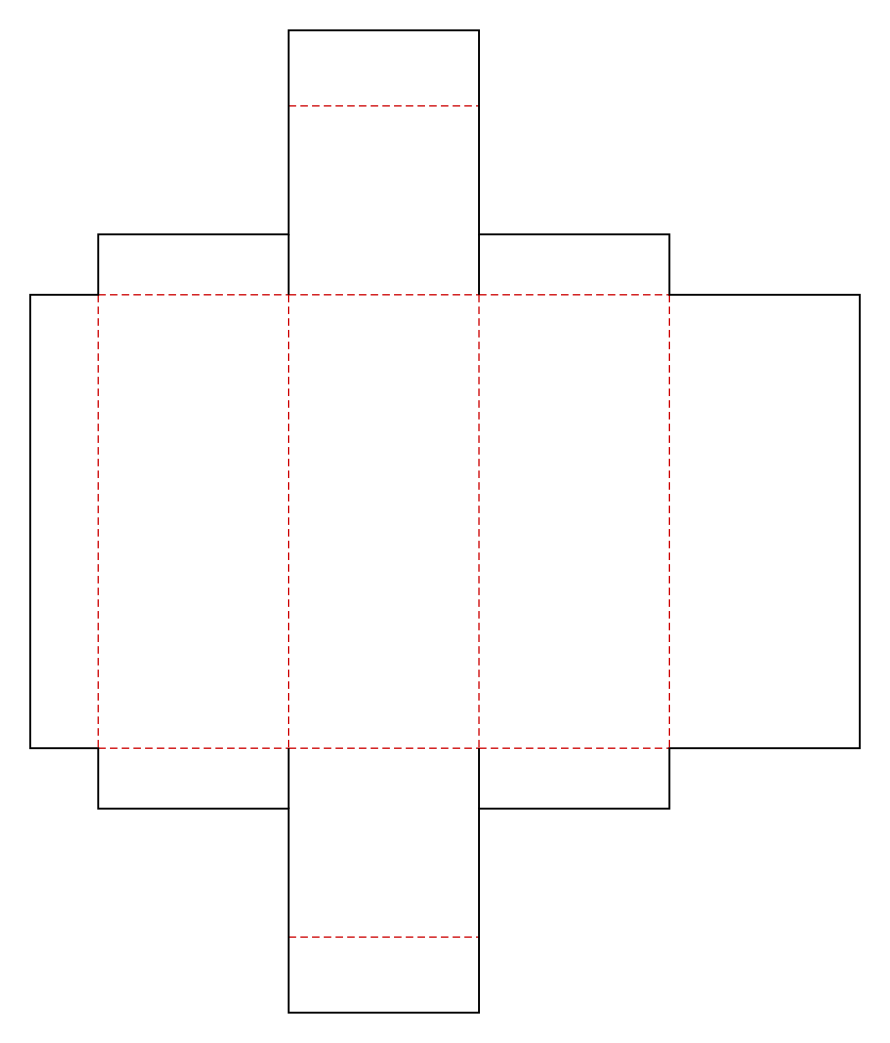
- Black line · cut
- Dashed red · fold
1–3: Type and strokes
The first three mistakes are type and lines that are still “live” in the file. A letter or a thin rule that looks fine on your screen can disappear on the printer’s computer.
- 1
Fonts still live, or a character missing
If the typeface stays live, the printer’s machine may not have it. Letters swap to another face or come out as empty boxes. Convert type to outlines before you send, or confirm with the printer that the font is embedded. A missing character drops out the same way; check the whole alphabet you actually use.
- 2
Strokes still stored as strokes
A stroke is a line weight, not a shape. When the file scales, that weight thins, thickens, or vanishes. Expand strokes to shapes before handoff. The layered vector checklist walks through that split.
- 3
Hairlines that vanish on cut or on press
A hairline is a stroke so thin it holds no ink, or disappears when the knife cuts. Seeing it on screen does not mean it will print. Give the rule a real weight, and do not confuse a decorative line with the cut line.
4–5: Bleed and layers
The fourth and fifth mistakes are the knife running through the artwork. In the dieline above, the cut is black and the fold is a dashed red line. They stay apart.
- 4
No bleed, and type too close to the cut
Bleed is artwork that runs past the cut, so a small shift does not leave a white edge. The safe area is the inner zone type should not enter, clear of both cut and fold. There is no single millimetre that every plant accepts; ask for their spec. Detail is on the bleed and safe page.
- 5
Cut and artwork on the same layer
If cut, fold, and art share a layer, the knife can run through the logo, or the fold line can print. Keep cut, fold, and artwork on separate layers. Naming is covered in the layer checklist.
6–7: Colour and scale
The last two mistakes are files that look right on screen and wrong on press. Colour space and the millimetre unit follow the printer’s spec.
- 6
The file is going out in RGB
Screen colour is RGB. Printing ink is not. An RGB SVG can come back pale or as a different hue. Ask which colour space the plant wants, and whether a spot colour is required. The SVG file is screen (RGB) colour; the CMYK print PDF in the bundle (FOGRA39, PDF/X-4) is the one made for print. The CMYK, spot, and white ink page explains the split on labels.
- 7
Wrong millimetres, or a missing or double cut
If the SVG unit is pixels or unitless instead of millimetres, the box comes out the wrong size. Two cut paths, or no cut at all, fail at the same gate. Compare the file with the millimetres in the brief, then use the preflight checklist.
Before you send
After these seven checks, package the file in the format the printer asked for. Many plants want PDF; the SVG can stay as the source. There is no rule that every printer accepts SVG. Next: print-ready dieline, how to send an SVG dieline, and the preflight checklist. The studio flow is on How it works. Questions: info@grapxo.com
Frequently asked questions
Is an SVG on its own enough?
Usually no. Many printers want a PDF. Keep the SVG as the source and convert to the file they asked for. The unit, the split between cut and fold, and a material note belong in the pack too.
Does Grapxo fix these mistakes for me?
No. Grapxo builds a vector surface and a dieline. Outlining type, separating layers, and the colour space are checks you make before you send. Final sign-off is at the plant.
How many millimetres of bleed?
There is no single number for every job. Ask the printer for their spec. Keep type off the cut and off the fold.
Why convert type to outlines?
A live font that the plant does not have will substitute or drop. Outlined type travels as shapes and no longer depends on the font file.
Why is an open stroke a problem?
A stroke is a line weight that can thin and vanish when the file scales. A stroke expanded to a shape stays the same object when the file is resized.
Why does an RGB SVG get rejected?
RGB is screen colour, not ink. The plant asks for its own colour space, and a spot colour when the job needs one. Grapxo’s SVG files are RGB; the print PDF in the bundle is CMYK (FOGRA39, PDF/X-4).
Start producing in the studio
Write your brief and let Grapxo produce a print-ready vector surface.