specimen
Grapxo
package
Design packaging from a brief — dieline included
Describe your product, size and brand. Grapxo’s design engine draws the box or label with its dieline at true millimetres, puts your design on it and exports print files: PDF/X-4 (CMYK), SVG and DXF with cut, crease and perforation on separate layers. It is a vector engine, not an image generator.
- Print-ready vector
- PDF/X-4
- Die line
From die line to box.
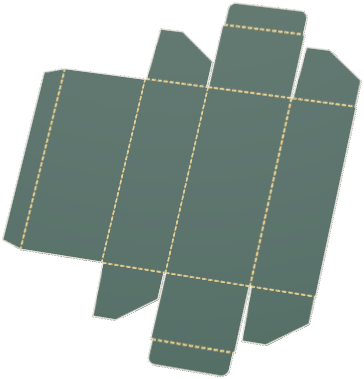
The studio builds every box together with its dieline: cut and fold lines are drawn at true millimetres, the print face sits on those lines, and when the box folds every face finds its place.
Hold the foil to the light.
Foil, emboss and varnish come after printing, and only read when light hits them. Move the cursor over the card; the light follows it.As you scroll, the light sweeps across the card.
The file that goes to the printer.
The print face and the knife come in separate files, on separate layers. The printer reads from the file what to print, what to cut and where to fold.
- PDF/X-4 print file.
- Cut, crease and perf on separate layers.
- 3 mm bleed, 3 mm safe area.
- The print PDF is delivered in CMYK (FOGRA39).

Frequently asked questions
Short answers about Grapxo, the studio, and design rights.
All questionsIs the output really print-ready?
The engine produces vector surfaces with dieline logic. A CMYK (FOGRA39) PDF/X-4 print file is included as well; material, special finishes and colour approval should be verified with your printer for your project.
How do design rights work?
One design right covers one product's design and is used when the first design is generated. In a project where a right has been used, changing the design is free. You can re-download the same design for free as many times as you like. After you have paid, small corrections to the same product are also free, 10 times every 30 days. Rights come with the plans (Starter, Pro, Agency; monthly or yearly); payment completes in the account panel.
Can I try it without an account?
No, generating a design requires an account. Sign up; 1 design right is loaded to your account for your first design — check your inbox if email verification is requested.
Is it suitable for agencies?
Yes — useful when you need to keep a brief tight and produce variants fast. Final client sign-off and print checks stay with you.
Explore packaging design software for small brands, see real engine output with the brief behind each design, or go straight to perfume box design, cosmetic packaging and food packaging. What the printer receives: print-ready dieline files.
Start producing in the studio
Write your brief and let Grapxo produce a print-ready vector surface.